· 12 min read Posted by Kevin Schildhorn
Skill Check: Reviewing the Android Skills Repo
Recently at the Android Dev Summit, the Android team made a lot of announcements about agentic development in Android. We covered some of these in our Agentic Development in Android post a couple of weeks ago, including a brief mention of the new Android Skills, but in this post we want to take a deeper look at them. The Android team revealed that they had created a new repository of AI skills specifically for Android development. These Android Skills include (as of this post) 42 skills to help developers with tricky and niche topics they might encounter during development. You can browse almost all of them on the Android development site, but in this post we’re going to dive into these skills and see what’s covered and how likely we’d be to use these skills.
How Do They Work?
If you don’t know what skills are, they represent on-demand expertise which is employed based on your request and the skill’s description. For example, one skill in this repo is for migrating from XML to Compose, which is something a typical agent might not know how to do properly. These skills are automatically used by agents based on your prompt, or can be specifically used by referencing them from within a coding agent.
The new Android Skills are located in a public repo on GitHub, separated by the domain they cover. Currently there are 42 skills covering 19 domains such as camera, security, navigation and more. If you’re worried you’ll need a Google-specific solution like Antigravity or Android CLI, don’t worry. These agent skills follow the open Agent Skills standard, which means that, in addition to Antigravity, you can use them in Claude Code, Codex, and any other agent or tooling that utilizes skills. Using a CLI, it takes at most two lines to install these skills as plugins, and then you can use them as you would any other skill.
So with all that being said, let’s dive into these skills.
The Skills
So what kind of skills are we looking at here? Well, in their own words, the skills cover “use cases and workflows where evaluations show LLMs underperform”. They don’t cover well-established areas like Compose best practices, but more niche or complicated topics like Android Auto parked apps or diagnosing ANR stack dumps. This is of course a great idea, as you and your agent already know the core building blocks of Android development like using DataStores, but for niche cases like adding ink brushes to your app you’ll want the help.
What’s Covered
As of this post, the skills cover topics such as form factors and surfaces (8) like Wear, XR, cars and widgets, UI and library integrations (8) such as CameraX, Ink and Navigation 3, identity and credentials (6), migrations and upgrades (5), on-device AI (5), performance and diagnostics (4), security and policy (4), and testing. Note that some skills cover multiple categories; this is just a generalization. There’s additionally an Android CLI skill to guide agents in the use of Google’s AI-First tooling, unlocking many testing and device based workflows. It’s a good balance of domains and edge cases. One thing that’s clear from their list is that a fair number of these skills are designed around new technologies announced at the Dev Summit. On-device AI stories, Android CLI with Journeys, and XR support all now have skills dedicated to them.
Here’s an important distinction to point out about these skills: these are Android Skills, not Kotlin skills per se. Sure, some of these skills cover common ground like Navigation3, but to be clear these skills revolve around Android. They include four to six skills that could be used for KMP, but the rest are for Android-specific topics. It would’ve been nice to see some more Kotlin-specific skills (I would’ve loved to see some skills around Coroutines as you can imagine if you’ve read my other posts), but I understand why they didn’t include them. Still, I appreciate the skills that can be used for KMP, and that specifically there’s a testing skill that suggests using Koin and SQLDelight for a KMP project (more on that later).
Skill Quality
Generally speaking, these skills are well written as you’d expect from the Android team, and range from 500 to 6,000 words. Some, such as Navigation3, point to local reference guides, while others have a stricter multi-step process. One thing that does concern me is the descriptions of some of these skills. As someone who has developed skills, I know that it’s important to have the description include when the skill is to be used so the agent will actually use the skill, and some of these don’t really convey that. For example, Navigation3’s description reads:
Learn how to install and migrate to Jetpack Navigation 3, and how to implement features and patterns such as deep links, multiple backstacks, scenes (dialogs, bottom sheets, list-detail, two-pane, supporting pane), conditional navigation (such as logged-in navigation versus anonymous), returning results from flows, integration with Hilt, ViewModel, Kotlin, and view interoperability.
That sounds more like a blog post intro than a description of how the skill should be used. It seems that the skills vary widely in description quality, so you may want to specifically call these skills by name.
Specific Skills
At Touchlab we pride ourselves on our shared knowledge of everything Kotlin and KMP, but let’s be honest: we can’t cover everything. I don’t know about you, but I’ve never worked on a project that needed an ink brush or Compose for TV or even used XR. Also, if we covered everything this post would take an hour to read. That’s really the beauty of these skills though, right? These niche topics that many of us have never used now have an advanced guide on how to use them, which is great. Plus the fact that these skills are coming directly from the Android team means that we can trust they are using best practices.
So with that being said, for this post I’m only going to look into what are, in my opinion, the two most ambitious and broadly applicable skills: testing-setup and ios-to-android.
Testing Setup
First up, a testing setup skill. I’m pleasantly surprised to see that this skill references a lot of third-party KMP tools. For DI it suggests Koin or Kotlin-Inject, for mocking, MockK, and it mentions both Room and SQLDelight. I could’ve seen them completely ignoring these and focusing on first-party tooling, so this is a nice touch. As for the skill itself, it covers setting up DI, installing frameworks like Espresso, refactoring code, prioritizing fakes over mocks, code coverage and a detailed list of testing instructions.
This skill will add a wide variety of tests, including:
- Business Logic
- UI Testing
- Database Testing
- Screenshot Testing
- UI Behavior Testing
- Navigation Testing (including Deep Links)
- End-to-End Testing
AI already overloads us with tests, so I’m curious to see how many tests it actually generates. At least with E2E tests, the skill specifies that they should cover about 5% of all tests.
There are a couple of things that caught my attention here. First, it says that if there are any Views at all, use Espresso. I’m surprised they took such a hard stance when they could’ve mixed and matched with Compose test rules. Another is that they specifically add DI, which could be a massive change to the codebase. I understand it’s important for proper testing; however, this could be its own skill, or they could at least ask whether it should be added. The same can be said for many parts of the skill such as code coverage, screenshot testing, E2E testing and so on. Sure, it’s important, but it’s not always a one-size-fits-all choice (screenshot testing even mentions that each screen should be tested in nine different sizes). I can see why they added all of this for best practices and the most coverage, but sometimes we’re not looking for everything but the kitchen sink.
iOS to Android
OK, this is the one I’m most excited about, a skill around converting from iOS to Android. At Touchlab this is kind of our bread and butter. From our beginning with J2ObjC and Doppl to fully embracing KMP, we’ve always been interested in the bridge between the two mobile OSes. This is also clearly the biggest skill by far, featuring 22 reference pages for individual migrations like Bluetooth, CameraX and Compose. This makes sense, as the skill covers any task that ports code from an iOS/Swift codebase, which is great. Only need one feature? Got it. Want to port an entire app? It’s got that covered too.
The skill itself is very thorough. It contains steps for both feature porting and whole-app porting, featuring a 10-step migration plan for full apps including 4 build gates (or checkpoints):
- Deep Source Audit, Domain Discovery & Migration Brief
- Subsystem & Capability Decomposition
- Formulate and Approve Phased Migration Plan
- Project Infrastructure, Gradle & DI Initialization (Mandatory Build Gate 1)
- Resource Catalog & Localization Migration
- Local Persistence & Storage Migration (Mandatory Build Gate 2)
- Core Architecture, Concurrency, State Hoisting & Secrets Handling
- Declarative UI & Navigation Porting to Jetpack Compose (Mandatory Build Gate 3)
- Hardware, Platform Services & Background Subsystems
- Build Verification, Test Porting, Quality Triage & Walkthrough Generation (Mandatory Build Gate 4)
It goes over both coding best practices and organizational practices such as package organization and design systems. It even includes a routing table to tell the agent which Android feature matches the iOS feature (e.g., if the code imports HealthKit, use Health Connect), with a reference guide to point to each of the 22 sections. It also includes potential slip-ups, such as mandatory Gradle updates (like if adding HealthKit then bump minSdk to 26). With all that said, let’s look at a real-life scenario by attempting to port an iOS project. We’ll look at IceCubesApp (a Mastodon client) for the migration as it’s a good size, features Liquid Glass, is written entirely in SwiftUI, has no Android equivalent already, and covers a wide range of functionality.
When the skill started, it created two artifacts in a hidden .migration folder. One was FeatureSpecification, which described the domain and technical mappings, along with some decision paths. The second was MigrationWalkthrough, which explained what happened, decisions made, verification steps, which guides were consulted, where features were added and what was missing. According to the report, the IceCubesApp with ~45k lines of Swift was migrated to a Kotlin project with ~9.6k lines of code, which means that some of the features weren’t migrated over (more on that below). Overall, the two look pretty similar, with each using its platform-specific visual style (Liquid Glass and Material).
| iOS | Android |
|---|---|
 |  |
I did notice some differences, though, such as the iOS project immediately prompting you to sign in, which did not happen on Android. Also, when refreshing the page, the iOS version has a nice sound effect which is missing on Android. Some of these differences, like the sounds, were noted by the agent, but others it missed without noticing. The settings are another place that looks quite different.
| iOS | Settings only on iOS | Android |
|---|---|---|
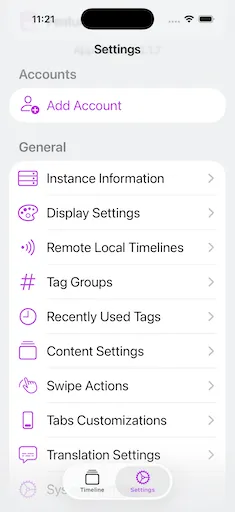 | 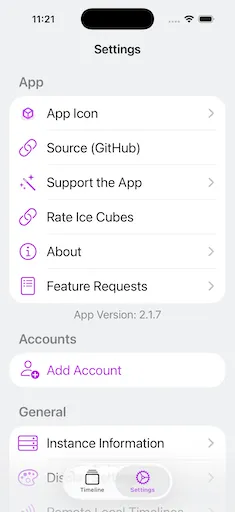 | 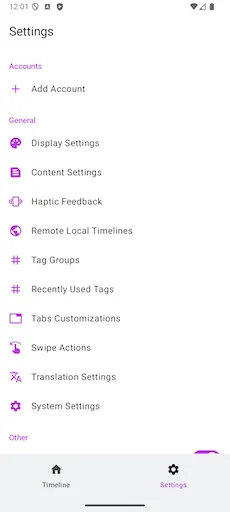 |
Again, each uses its platform’s visual style, but the iOS version has many more options that weren’t included in the Android version. Some of these things were because of missing requirements like a Firebase account for configuration. Others were missing because the skill didn’t mention them, such as migrating the widget from iOS. Some were just flat-out missing features for no apparent reason, like custom fonts and alternate app icons. You can see on the settings page that the iOS version has an about page and a link to the source, which are not there for Android.
The agent also admitted to me that some of the settings that appear in the app actually don’t do anything on Android! Also, when prompted, the agent mentioned that about 20 features were not added or mentioned in the migration docs. While most were minor differences, some larger omissions included offline caching and follow-up posts, which are pretty huge. The skill did cover most Android-specific things, but didn’t help with work like OAuth sign-in.
Looking at the code, again, on the surface it looks good, with the architecture you’d expect and very readable code, including comments as to where code was migrated from. The problem comes with some design choices that the agent decided to make on its own. In certain areas the agent ignored parts of the skill entirely. It ignored three reference links (resources-and-assets.md for resources, ui-animations.md for withAnimation, and dependencies-and-concurrency.md for dependencies), ignored an instruction to use Tink and instead just implemented it on its own, and even decided not to write UI tests even though the skill asked for them. It also didn’t add a ViewModel for every screen even though the skill specifically states “Every screen must collect state from a Jetpack ViewModel”. When I asked the agent why it did this, it came up with two real reasons:
- It wanted to match the iOS code verbatim
- It was quicker to do
The honest reason is speed. These came late, and a
LaunchedEffectwas quicker to write than another ViewModel and state class.
Ignoring the second reason, the first one brings up an interesting decision for the AI. The original code didn’t have a ViewModel for every screen, but the skill said you need one for every screen while also saying to port it as closely as possible. So which one do you pick? Clearly it chose the latter, but personally that’s not what I would’ve wanted. You can argue this is an agent issue and not a skill issue, but in my opinion the skill should enforce how things should be done so that the agent won’t just ignore its instructions.
Conclusion
So that’s our deep dive into Android’s new skills. There was a lot to cover and only so much time, but hopefully you can get an idea of what the skills are meant for and how they can be helpful. I’ll be curious to see how these skills evolve and if more skills are added in the future, but for now they’re definitely welcome. I encourage you all to try some of them out for yourselves to see how well they work and if they can boost your development as intended.